
Moving emails into Omnifocus

One of the most effective ways to turn emails into actionable tasks in OmniFocus is to import them as tasks. However, simply dragging and dropping emails directly from an email client into OmniFocus produces poor results: the email body is not preserved, making it difficult to refer back to the original content when completing the task.

The Problem

  • Drag-and-drop creates a task with limited or no email content.
  • When reviewing the task later, the context needed to take action is missing.

The Solution

The best way to overcome this limitation is to:

  • Use the email subject as the OmniFocus task title
  • Attach the full email as a file to the task, preserving all content for reference

This workflow is achieved by using two additional macOS applications: Dropzone and Hazel.

Tools Used

1. Dropzone

Dropzone allows you to drag emails from your email client and drop them onto the Dropzone app. When you do this:

  • The email is saved as a file
  • The file is stored in a predefined folder of your choice

This ensures the full email content is preserved.

2. Hazel

Hazel monitors the folder used by Dropzone and watches for new files. When an email file appears and matches your defined criteria, Hazel automatically:

  • Creates a new task in OmniFocus
  • Uses the email subject as the task title
  • Attaches the saved email file to the OmniFocus task

Hazel:
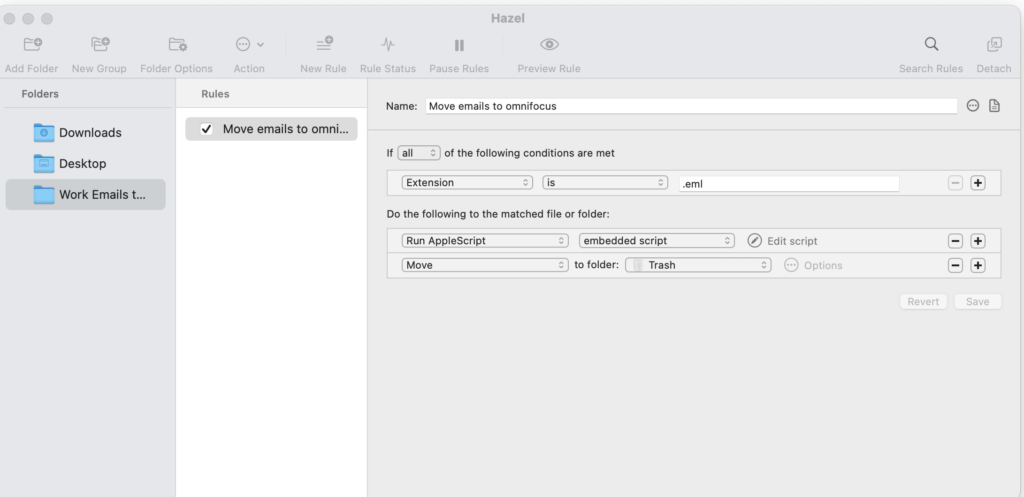
Notice we run an AppleScript, this is the magic script that does the shifting a lifting to give us a really good result and get the omnifocus task behaving as we want it.

Applescript

The AppleScript is where most of the automation happens. It takes the email file from the Finder (placed there by Dropzone and processed by Hazel) and creates a task in OmniFocus, attaching the email and applying your preferred metadata.

Code:

tell application "Finder"
	set _path to (the POSIX path of theFile as string)
	set {_name, _extension} to {name, name extension} of theFile
	set _name to text 1 thru -((count _extension) + 2) of _name
	
	set theDate to current date
	set theTask to "Review Email - " & _name & ""
	set theNote to return & return & "Imported by Hazel on Macbook Pro - " & (theDate as string) & "
    "
end tell

tell application "OmniFocus"
	tell front document
		set theTag to first flattened tag where its name = "Email Action"
		set theProject to first flattened project where its name = "Work Single Action List"
		tell theProject
			set theTask to make task with properties {name:theTask}
			set note of theTask to theNote
			set myNewDate to (current date) + (2 * days)
			set due date of theTask to myNewDate
			tell the note of theTask
				make new file attachment with properties {file name:theFile, embedded:true}
			end tell
			add theTag to tags of theTask
			return theTask
		end tell
	end tell
	
	
end tell


Task Title

set theTask to "Review Email - " & theName

theTask defines the OmniFocus task title

  • In this example, the task is prefixed with “Review Email –”
  • You could easily change this to something like:
    • "Email Task - "
    • "Action from Email - "
    • or remove the prefix entirely

Task Note

set theNote to "Imported by Hazel on MacBook Pro" & return & theDate

theNote sets the note field in OmniFocus

  • This is a useful place to record:
    • Which machine imported the email (e.g. MacBook Pro or Mac Studio)
    • The date and time of import

This information is especially helpful when troubleshooting:

  • If an import fails
  • If you need to check the bin or recover the original email

Tag Assignment

set theTag to "Email Action"

theTag assigns a tag in OmniFocus

  • In this workflow, “Email Action” clearly identifies tasks that originated from email
  • You can rename this to suit your system (e.g. EmailInboxFollow-up)

Project Selection

set theProject to "Work Single Action List"

theProject determines which OmniFocus project receives the task

  • Important: Project names are case-sensitive
  • The name in the script must match the OmniFocus project name exactly

Due Date Calculation

set myNewDate to (current date) + (2 * days)

myNewDate sets the task due date

  • In this example, the due date is calculated as two days from now
  • You can adjust this easily:
    • (1 * days) for next day
    • (3 * days) for a longer buffer
    • Or remove it entirely if you prefer to set due dates manually

.
Web Design is 95% Typography

Responsive web design offers us a way forward, finally allowing us to design for the ebb and flow of things. There are many variations of passages of Lorem Ipsum available, but the majority have suffered alteration in some form, by injected humour, or randomised words which don’t look even slightly.

Nulla elementum risus quis risus viverra eget venenatis mi adipiscing. Morbi massa tellus, elementum quis laoreet et, vehicula in ante. Vestibulum ut leo facilisis libero placerat viverra. Donec non nunc quam. Phasellus congue, nulla ac dignissim pharetra, dolor lectus ultricies risus, a aliquet diam turpis pellentesque sapien. Sed at elit lorem, sit amet scelerisque tellus. Nunc nec suscipit tellus. Maecenas faucibus tristique eros eu feugiat. Sed tincidunt pulvinar velit, quis facilisis elit ultrices sit amet. Praesent id est suscipit diam rhoncus ornare et sit amet ante.

Praesent mattis luctus elit, et varius risus facilisis vel. Proin sed felis velit. Duis adipiscing neque vitae erat vulputate vel tincidunt odio facilisis. Nullam sapien diam, ultrices quis hendrerit id, ornare id velit. Curabitur in placerat nibh. Sed ut mi vel nisl feugiat varius a a mauris. Vivamus eros mi, eleifend ut interdum eget, pulvinar et neque. Phasellus facilisis eros pharetra ligula venenatis adipiscing. Aliquam pulvinar turpis sed diam lacinia nec volutpat ipsum tempus.

Nulla facilisi. Curabitur pretium ante id felis tempor non venenatis eros pretium. Aliquam blandit rutrum eros non pretium. Fusce tellus nibh, fringilla sit amet suscipit ut, fringilla et nisi. Suspendisse quis velit dolor. Phasellus nec tellus et magna pulvinar sodales eu eget felis. Praesent venenatis elit eget erat venenatis a faucibus nibh luctus. Etiam dictum tincidunt scelerisque. Fusce diam sapien, sagittis nec lobortis in, posuere id quam. Maecenas egestas orci sed quam tincidunt ut lobortis ligula venenatis. Mauris et consectetur augue. Cras est neque, sollicitudin eget porta ut, dictum molestie lacus. Proin non risus id risus cursus vehicula in vel justo. Mauris quis pretium diam.

Maecenas mollis lacus a leo posuere interdum. Nunc pellentesque fermentum molestie. Aliquam eget est est. Vestibulum vitae tortor eu dolor gravida suscipit. Proin consectetur ligula tempus mauris facilisis elementum. Duis scelerisque orci eu mi placerat non sodales dui ullamcorper. Integer at magna tortor. In malesuada molestie quam eu dictum. Vivamus sed quam non arcu commodo porta a quis dolor. Vivamus euismod augue eget nisi posuere porttitor. Sed lobortis velit eget nisl gravida vel egestas enim varius. Nam et enim commodo leo rutrum dapibus. Aenean varius turpis a nunc hendrerit adipiscing. Integer dignissim elementum ornare. Morbi ut dui nisi. Suspendisse sagittis viverra consequat.

Nulla placerat, leo ac blandit vestibulum, urna nisi blandit quam, sed tincidunt urna mauris in tortor. Proin tempor est ut dui tincidunt eu euismod felis cursus. Morbi sodales libero vel tortor lacinia pellentesque. Cras et dolor leo. Fusce blandit euismod nisl non varius. Aenean turpis diam, lobortis ac iaculis porttitor, adipiscing sit amet turpis. Aliquam erat volutpat. Cras ac lacus vitae justo vestibulum elementum. In sodales lectus ante. Lorem ipsum dolor sit amet, consectetur adipiscing elit. Ut ut libero orci. Maecenas eu eros ac purus eleifend adipiscing at quis metus. Suspendisse non nisl tempus purus egestas pharetra. Maecenas tempus massa et ipsum venenatis eu venenatis turpis aliquet. Nam fermentum scelerisque porta. Suspendisse eu enim a risus luctus auctor pellentesque vitae magna.

Paper by FiftyThree

Paper is where ideas begin. It’s the easiest and most beautiful way to create on the new iPad. Capture your ideas as sketches, diagrams, illustrations, notes or drawings and instantly share them across the web. Download “Paper by FiftyThree” from the App Store.

Performance Optimization for Websites

Responsive web design offers us a way forward, finally allowing us to design for the ebb and flow of things. There are many variations of passages of Lorem Ipsum available, but the majority have suffered alteration in some form, by injected humour, or randomised words which don’t look even slightly.

Integer lobortis magna ut turpis sagittis ac faucibus neque lobortis. Vivamus vel dapibus metus. Nulla facilisi. Etiam pulvinar mi eu mi vulputate laoreet. Donec ligula neque, lacinia in cursus at, ullamcorper nec augue. Aliquam erat volutpat. Etiam pellentesque fermentum nisi, et adipiscing magna ornare id. Vestibulum molestie suscipit metus varius elementum. Pellentesque laoreet sollicitudin consequat. Proin faucibus enim posuere mi aliquam nec fermentum ante laoreet. Suspendisse lectus nisl, adipiscing ac dignissim eget, volutpat non enim. Nunc eu augue urna, non ornare mauris. Aliquam laoreet tincidunt arcu, vel rhoncus diam blandit at.

In vehicula tempus auctor. Fusce sed lorem ut libero sodales dignissim vitae eget urna. Curabitur quis tempor ante. Cras at aliquet elit. Donec est lacus, interdum nec rhoncus sit amet, mattis sed diam. Fusce imperdiet luctus magna eu pretium. Quisque convallis sagittis pharetra.

Vestibulum eu malesuada felis. Pellentesque id lorem non felis tincidunt aliquet. In lacinia facilisis ipsum non laoreet. Donec ut purus mauris, eget semper lacus. Mauris eu mauris sem, id mollis lacus. Mauris tempor sodales lacinia. Etiam ullamcorper sagittis purus, a facilisis felis elementum id. Nulla facilisi. In hendrerit lorem eget lectus imperdiet sit amet pellentesque mi rutrum. Cum sociis natoque penatibus et magnis dis parturient montes, nascetur ridiculus mus. Praesent elementum, turpis convallis elementum blandit, augue dolor porta sem, volutpat dictum nisl orci id leo. Pellentesque id elit eget nisl vestibulum vehicula sit amet adipiscing felis. Aenean egestas quam nec mi mattis malesuada. Morbi ac neque at ante feugiat porttitor nec sit amet dui.

Sed sed augue tortor. Donec dui nulla, scelerisque et faucibus sit amet, adipiscing sodales mauris. Aliquam quis nisi nec felis fringilla sagittis a non eros. Suspendisse malesuada blandit magna et semper. Lorem ipsum dolor sit amet, consectetur adipiscing elit. Etiam luctus, dolor vel pulvinar placerat, sem arcu aliquam leo, quis vestibulum elit mauris ac elit. Aliquam erat volutpat.

Chat format

JOHN:

Hey there

MARY:

This is an example of a WordPress page, you could edit this to put information about yourself or your site so readers know where you are coming from.

JOHN:

What is this

SMITH:

Aye, matey!

JOE:

Huh?